
Turn a Simple Keyword Into an Experience.
Create questionnaires, customer journeys, and automated prompts for your customers. When they send the right keyword on WhatsApp, KreativeRock automatically starts the conversation, asks the questions you set, and collects their responses in real time.
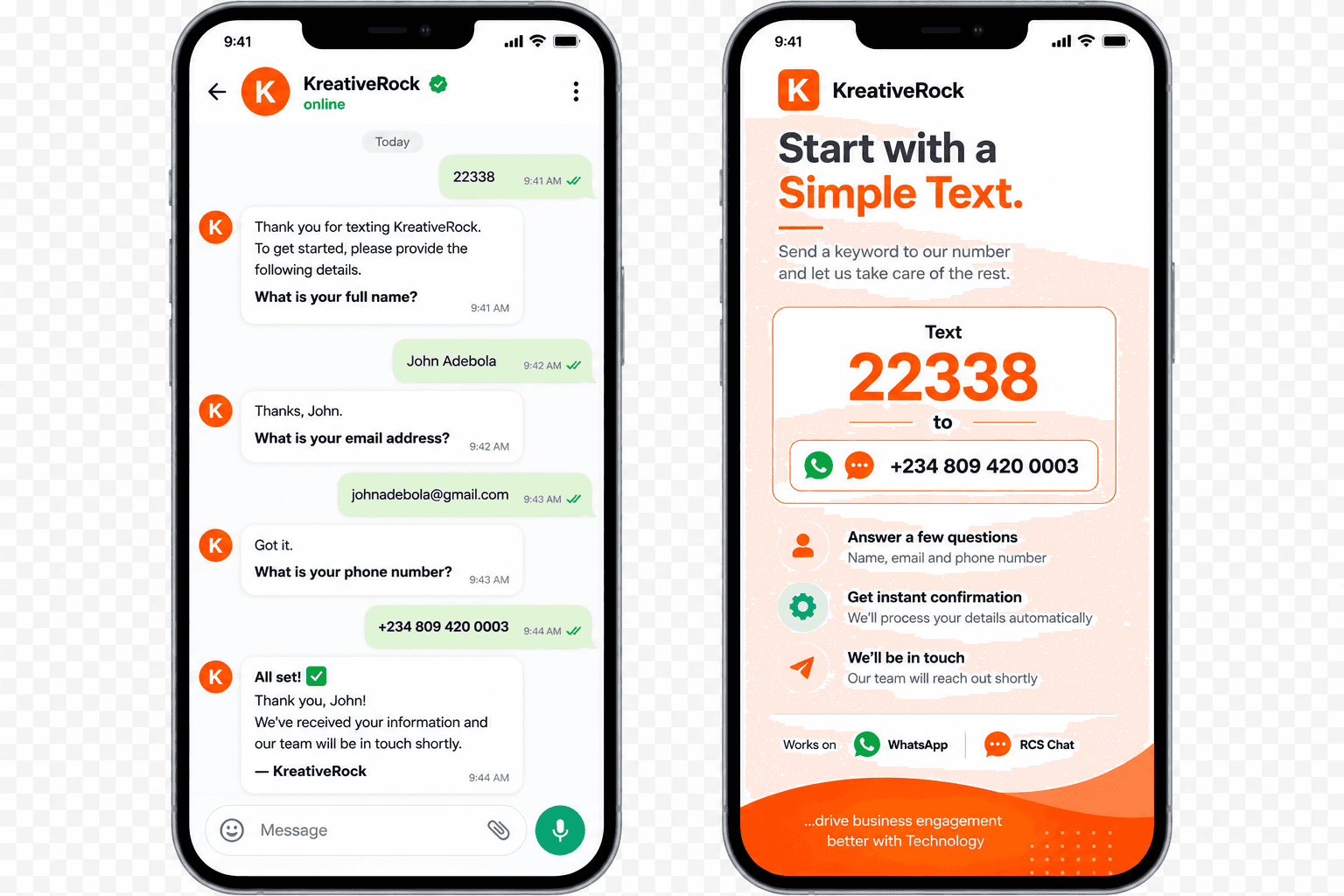
Keyword Messaging Solutions
Lead Capture
Use a keyword to start collecting customer information automatically.
Customer Registration
Guide customers through registration by asking questions one at a time.
Product Enquiries
Let customers request information about a product or service using a keyword.
Campaign Responses
Give every campaign a simple keyword customers can use to respond.
Promotions & Offers
Customers can text a keyword to access an offer, discount, or promotion.
Information Requests
Let customers request information and receive automated responses.
What You Can Do
Create custom keywords
Trigger automated conversations
Ask questions automatically
Collect customer information
Capture names and contact details
Qualify leads
Collect enquiries
Send automated responses
Route conversations to your team
Follow up with customers
Work across WhatsApp
Track customer responses
What Can You Collect?
Customer Details
Name, email, phone number, and other basic information.
Lead Information
Business needs, interests, budget, and other qualifying questions.
Enquiries
Product requests, service enquiries, and customer questions.
Preferences
Product choices, locations, appointment preferences, and more.
Responses
Survey answers, campaign responses, and customer feedback.
Use Cases
Lead Generation
Capture and qualify new leads automatically.
Promotions
Customers send a keyword to claim an offer or learn more.
Event Registration
Collect attendee information and registration details.
Customer Registration
Guide new customers through a simple registration process.
Product Enquiries
Let customers request information about products or services.
Surveys & Feedback
Ask questions and collect responses automatically.
Appointment Requests
Collect customer details and appointment preferences.
Campaign Engagement
Turn advertising and offline campaigns into measurable conversations.
How It Works
I create the journey
Build the questions and the flow you want customers to go through.
I give customers a keyword
Share a simple word customers can send to start the conversation.
They send it
A customer texts the keyword on WhatsApp.
My conversation starts automatically
KreativeRock asks the questions and collects the responses in real time.
Ready to Set Up Your First Keyword?
Tell us what you want customers to be able to text, and we'll help you get set up.
Make an Enquiry
Let's talk about your business.
Tell us what you're looking to achieve, and our team will recommend the right solution for your business.
Schedule a Meeting
Book a one-on-one meeting with a KreativeRock team member and discover the right solutions for your business.
Book on Calendly